Client Configuration#
Adding a network location#
Troubleshooting#
Windows Explorer integration#
The service responsible for handling the requests from the client computer to the ZFC-server is de WebClient service. This service enables Windows-based programs to create, access, and modify Internet-based files. If this service is stopped, these functions will not be available. If this service is disabled, any services that explicitly depend on it will fail to start. So in order for the Zero Footprint Client to work you have to make sure that this services is not disabled.
This service runs under the "Local Service" account. The service uses the %systemroot%\ServiceProfiles\LocalService\AppData\Local\Temp\TfsStore\Tfs_DAV folder to store temporary files. This path is not accessible for normal users. But for a correct working of the server you have to make sure that the "Local Service" account has access to this folder.
If you are using a HTTP connection instead of an HTTPS connection then you have to explicitly tell the WebClient service that this is allowed. Instructions to do this can be found here:
https://docs.microsoft.com/en-US/office/troubleshoot/powerpoint/office-opens-blank-from-sharepoint
https://docs.microsoft.com/en-us/iis/publish/using-webdav/using-the-webdav-redirector#webdav-redirector-registry-settings
For Microsoft Office application there is a separate procedure described here:
At this moment the Zero Footprint Client uses Basic Authentication
Microsoft Office#
It is possible to use Single Sign-on for the ZFC in combination with Microsoft Office. When the user tries to open an Office document for the very first time the user may get a warning about an unsafe sign-in method. There are two possible situations
- The may get the following message:
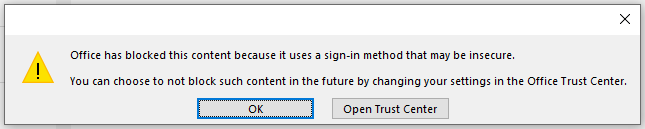 From this dialog the user can go directly go to the Office Trust Center. In this case the Sign-in prompt behavior is set to "Block all sign-in prompts". For Single Sign-on to work properly this should be changed to the option "Ask me what to do for each host". Now the current host can be added to the list containing "Host allowed
he user is prompted to trust the sit
Office has blocked this content because it uses a sign-in method that may be insecure