Single Sign-on Authentication
The Zero Footprint Client application supports Single sign-on for both the Microsoft Office applications and from the Windows Explorer. The Zero Footprint Client application does not include a full blown Single sign-on solutions. It always works in conjunction with your existing Single sign-on solution.
Single sign-on support for the Microsoft Office applications is build on top of the Office Forms Based Authentication Protocol (MS-OFBA). This protocol enables HTTP-based forms authentication. You have to make sure that your Office configuration supports this authentication method.
Note that the Zero Footprint Client application itself will not authenticate the user. You have to provide an external authentication provider which will then be connected to the Zero Footprint Client application. The component managing the connection between the authentication provider and the application is the Zero Footprint Server TAI. From the documentation a TAI is described as such:
Trust Association interface (...) is a service provider API that enables the integration of third party security service (for example, a reverse Proxy, etc) with WebSphere Application Server.
The idea is during processing the Web request, WebSphere Application Server calls out and pass the HttpServletRequest and HttpServletResponse to the trust association interceptors. The trust association interceptors are considered to be trusted by WebSphere Application Server. The trust association interceptors can inspect the HttpServletRequest to see if it contains security attributes (authentication or authorization attributes) from the third party security service.
There are different ways you can connect your external authentication provider to the Zero Footprint Client application depending on your situation. The application has two endpoints which play an role in this situation. Both the endpoints are configured using the ECMP Zero Footprint Client Configuration plug-in.
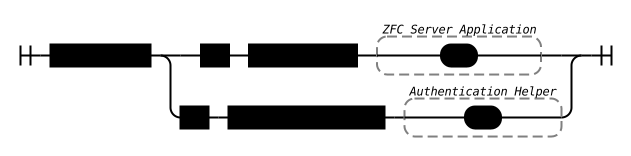
The path-prefix path is the main entry point into the application. This path handles all the authentication itself in conjunction with the Zero Footprint Server TAI. Therefore this path must be excluded from all external authentication mechanisms. Note that normally the path-prefix is optional, but if you want to use single sign-on then this is no longer the case.
The logon-path-prefix path is the entry point which handles all the authentication. The logic behind this endpoint will vary based on your situation.
In the next two sections two different scenario's will be discussed. The authentication flow using the MS-OFBA protocol is used as an example. This flow is relatively easy to follow. (Section 4 of the documentation also contains an example of this flow). Authentication using the Windows Explorer application is more complicated but follows the same principles.
Single sign-on using a Reverse Proxy#
The first scenario is when authentication is handled by a reverse proxy or a load balancer in combination with an external authentication provider. In this case the logon-path-prefix path must be added to your reverse proxy configuration as a path that will trigger the external authentication provider.
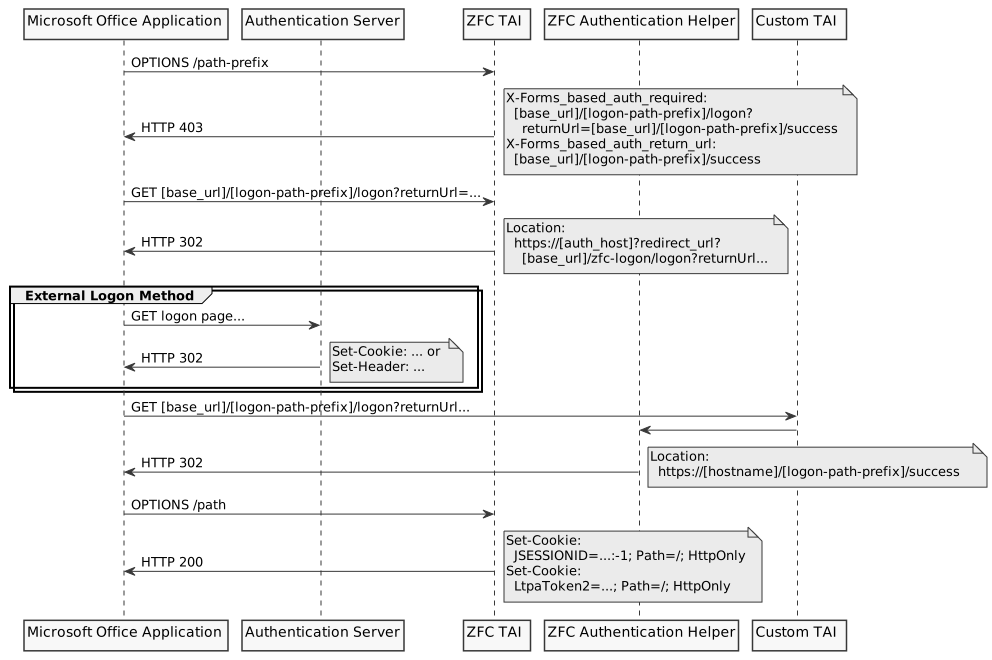
The flow start with a Protocol Discovery Request (Section 2.2.1). This is an OPTIONS request on the path-prefix path. The server responds with status code 403 Forbidden and adds two headers to the response:
X-FORMS_BASED_AUTH_REQUIRED: this is the URL the Office application will navigate to to authenticate the user. This URL is based on thelogon-path-prefixpath.X-FORMS_BASED_AUTH_RETURN_URL: this is the URL signaling to the Office application that the authentication process succeeded.
Next the Office application issues a GET request to the URL specified in the X-FORMS_BASED_AUTH_REQUIRED header. As this URL navigates to a path that requires authentication, the reverse proxy will redirect the application with a 302 response to the external authentication provider. This provider will establish the identity of the user and provide details of this identity in either a header or a domain-cookie. Next the original GET request is issued again. A custom TAI will use the values provided by the identity provider to authenticate the user within the WebSphere server and then proceeds to the ZFC Authentication Helper component. This component sends a redirect to the URL specified as the return URL. This signals to the Office application that the process is completed. At this point the Office application will proceed with the normal procedure for opening a document for editing.
Single sign-on using a Custom Application#
In case a custom application will handle the authentication the logon-path-prefix path must configured to point to the custom application.
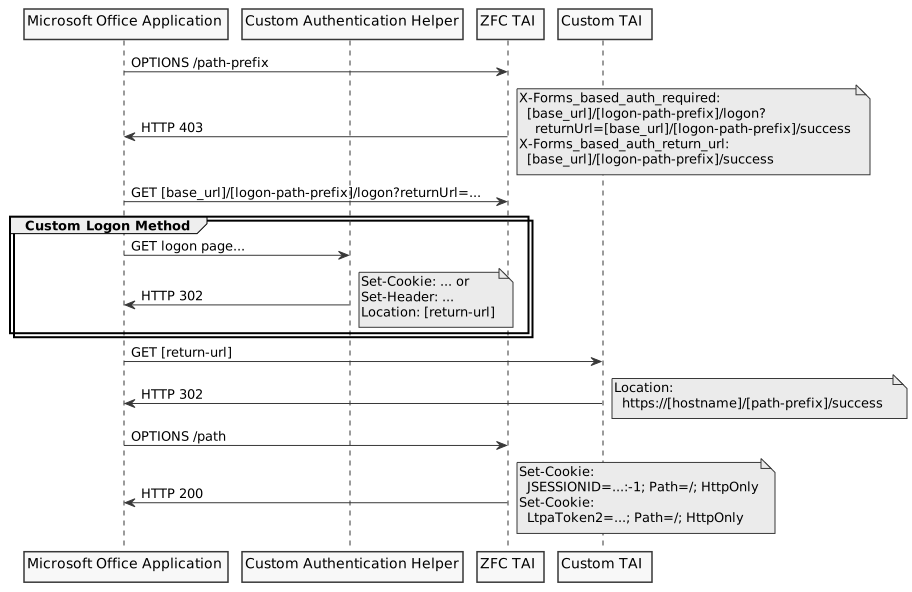
The sequence will start in the same manner as the previous situation, but instead of triggering the external authentication provider, control is directly given to the custom application. Now it is the responsibility of the custom application to establish the identity of the user. If this is succeeded then the custom application should navigate to the return URL specified in the original request. This redirection should also contain headers or cookies identifying the user. This information is used by the custom TAI to authenticate the user. Next the user will be redirected by the URL specified in the Protocol Discovery Request to signal the completion of the process.